Intermittent Fasting Tracker
Free intermittent fasting tracker — pick a window, run it with a live timer, and keep a rolling record of what you actually did.
The web app works on iPhone, Android, desktop, and tablet — same experience everywhere. Prefer a home-screen icon and native notifications on Android? Get the Android app instead.

What it can do
Pick a schedule or build your own
Twelve presets from 12:12 through 23:1, plus a custom hour selector.
Flexible or clock-based
Start the timer manually each day, or lock your eating window to fixed daily times that cycle automatically.
One glance tells you where you are
Timer shows current phase and eating window boundaries. The nav badge in the bottom bar updates every second so one glance tells you where you are.
30-day history on every session
Completed and cancelled fasts are kept for 30 days. Eat Early and Fast Early controls handle exceptions.
Built-in schedule presets
How the Intermittent Fasting Tracker works
What the Intermittent Fasting Tracker actually does
The Intermittent Fasting Tracker pins a daily fasting window to a live timer you can glance at, and keeps a record of what you have actually done. Twelve presets are built in grouped by difficulty — from 12:12 up to 23:1 — plus a custom window in one-hour increments.
Two modes are supported:
- Flexible ("Start Now") — tap to begin a fast after your last meal; the end is computed from your window length.
- Daily Schedule — pin the eating window to fixed clock times (for example 12:00–20:00). The cycle repeats automatically each day.
Your chosen schedule, mode, and clock times persist across app restarts, and an active session is reconstructed from the start time whenever you reopen.
What you see during a session with the tracker
A timer shows your current elapsed and remaining time (toggle which direction you read), the current phase — fasting or eating — and your eating window boundaries.
Plans change: Eat Early lets you close a fast before target as a one-time exception or a permanent shift. Fast Early ends the eating window ahead of schedule. Completed and cancelled sessions from the last 30 days stay in your history.
Notifications are opt-in per account — when enabled, they remind you at key moments in your schedule.
How to use the tracker
In the bottom navigation bar, the fasting badge updates every second with your current phase and time remaining — the eating window shows in a warm color, fasting in the default. That one-second glance is often all you need to decide whether you can start eating yet, without opening the full tracker.
Pick a window you can actually repeat for a few weeks, let the schedule run, and only adjust after you have a week of clean data.
App Features

Extended Fasting Tracker
Run a deliberate long fast from 24 to 168 hours, with stage content through the first 72 hours and milestone callouts.


Weight Tracking
Free weight tracker — log daily, edit any entry inline, and watch the trend over time.


Walking Tracker
Free walking tracker — start a timer, pick your pace, and let pause/resume handle real-life interruptions.

Calorie Tracker
Free manual calorie tracker — log meals once, save them to My Foods, and watch your daily remaining calories update live.
90-Day Challenge
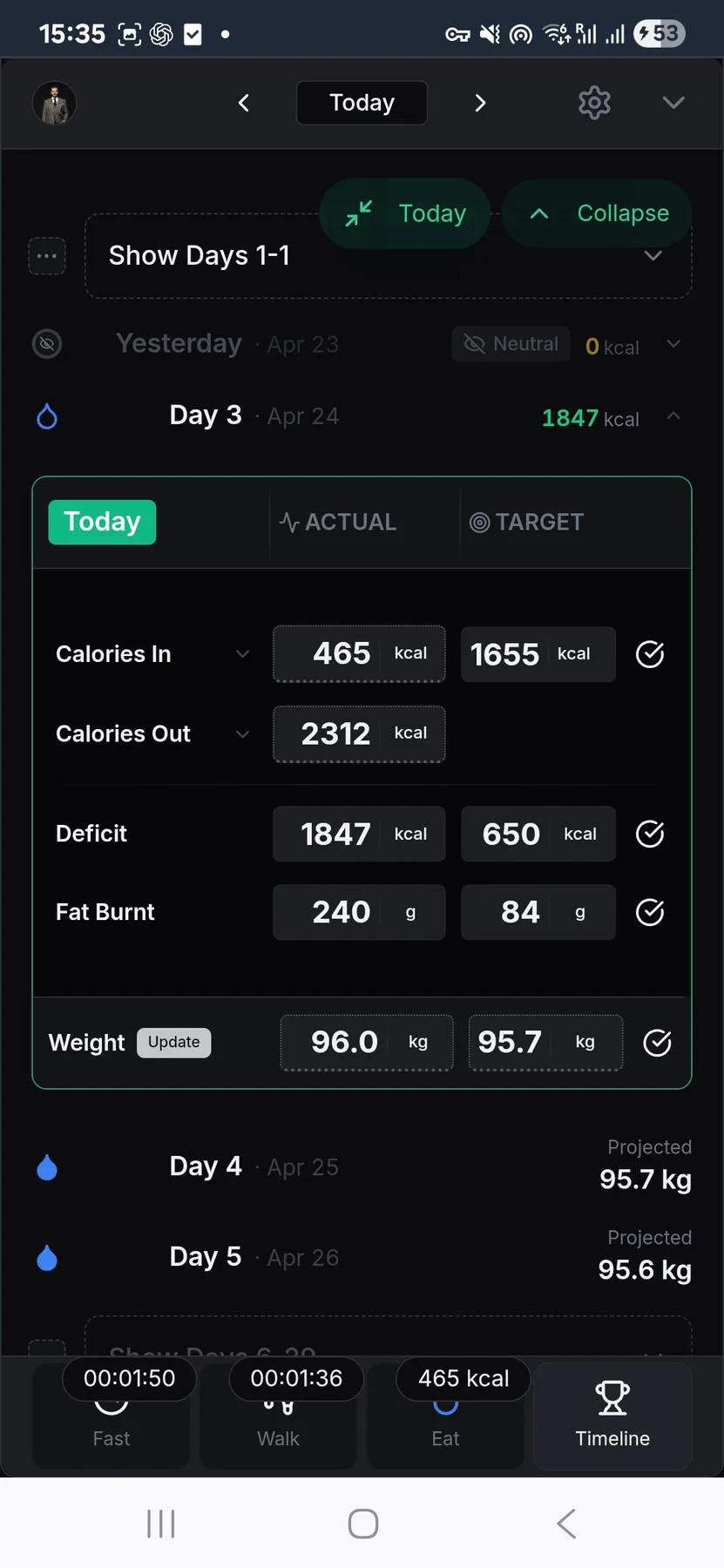
The structure layer: set a goal weight, pick 30 to 180 days, and the app aggregates every food, walking, and weight entry into one timeline.
Related guides

Why thirst looks like hunger and how to tell the difference
My own signals aren't always clear. Sometimes what felt like hunger was thirst. Here's what I noticed, and what I tried.

Diet drinks during a fast or a deficit: a self-test
Whether zero-calorie or diet drinks belong in a fast or a deficit is a common question, and the honest answer is that it depends on you. They help some people a great deal and…

The window after the fast, and how to use it
Breaking the fast can read like the finish line, the reward at the end of the hard part. Seeing it that way wastes the most useful stretch of the whole program. The days right…

The first week: what is happening and why it eases
The first serious stretch of eating far less, or a fast of a day or two, does not read as progress while you are in it. You are hungry in a way that seems urgent. You are…
Frequently asked questions
Which fasting windows does the tracker support?
Twelve built-in presets, grouped by experience level:
- Beginner: 12:12, 13:11, 14:10, 15:9
- Intermediate: 16:8, 17:7, 18:6, 19:5
- Advanced: 20:4, 21:3, 22:2, 23:1
You can also set a custom split in one-hour steps, so the tracker fits a routine you already follow instead of forcing a fixed one.
What's the difference between Start Now and Daily Schedule?
They're the two schedule types you pick when setting up a plan:
- Start Now — begins fasting the moment you tap start, and you restart it manually each day.
- Daily Schedule — you set a fixed eating window (say, stop eating at 7:00 PM) and it tracks the same times automatically, every day.
Use Start Now for a flexible day; use Daily Schedule when you want a routine that repeats on its own.
Does the timer survive app restarts?
Yes. Your selected schedule, mode, eating-window times, and active session are saved to your account. If you close the app and reopen it later, the session is reconstructed from the recorded start time, so the timer catches up instead of starting over.
Can I end a fast or eating window early?
Yes. Eat Early closes an active fast before the target time, either as a one-time exception or as a permanent schedule shift. Fast Early does the opposite: it ends the eating window ahead of schedule and begins the next fast. The point is to handle exceptions without pretending they did not happen.
Where do past sessions and notifications live?
Completed and cancelled fasts stay in your history for the last 30 days. While a plan is active, the timer runs as one continuous loop — it shows your current phase plus the time elapsed and remaining, and keeps cycling through fasting and eating windows until you stop it. Notifications are opt-in, so you only get the reminders you switch on.
Use this feature now
Intermittent Fasting Tracker
The web app works on every device, including iPhone. Android users can also install the native app from the Play Store.