90-Day Challenge
The structure layer: set a goal weight, pick 30 to 180 days, and the app aggregates every food, walking, and weight entry into one timeline.
- 30–180 days
- Day X of Y
- Auto-aggregates
- Edit goal mid-way
- Free
The web app works on iPhone, Android, desktop, and tablet — same experience everywhere. Prefer a home-screen icon and native notifications on Android? Get the Android app instead.
How it works
- 1
Set up the Challenge
Pick your duration (90 default, 30–180), start date, current weight, and goal weight — the app calculates the daily calorie target.
- 2
Day X of Y, auto-aggregated
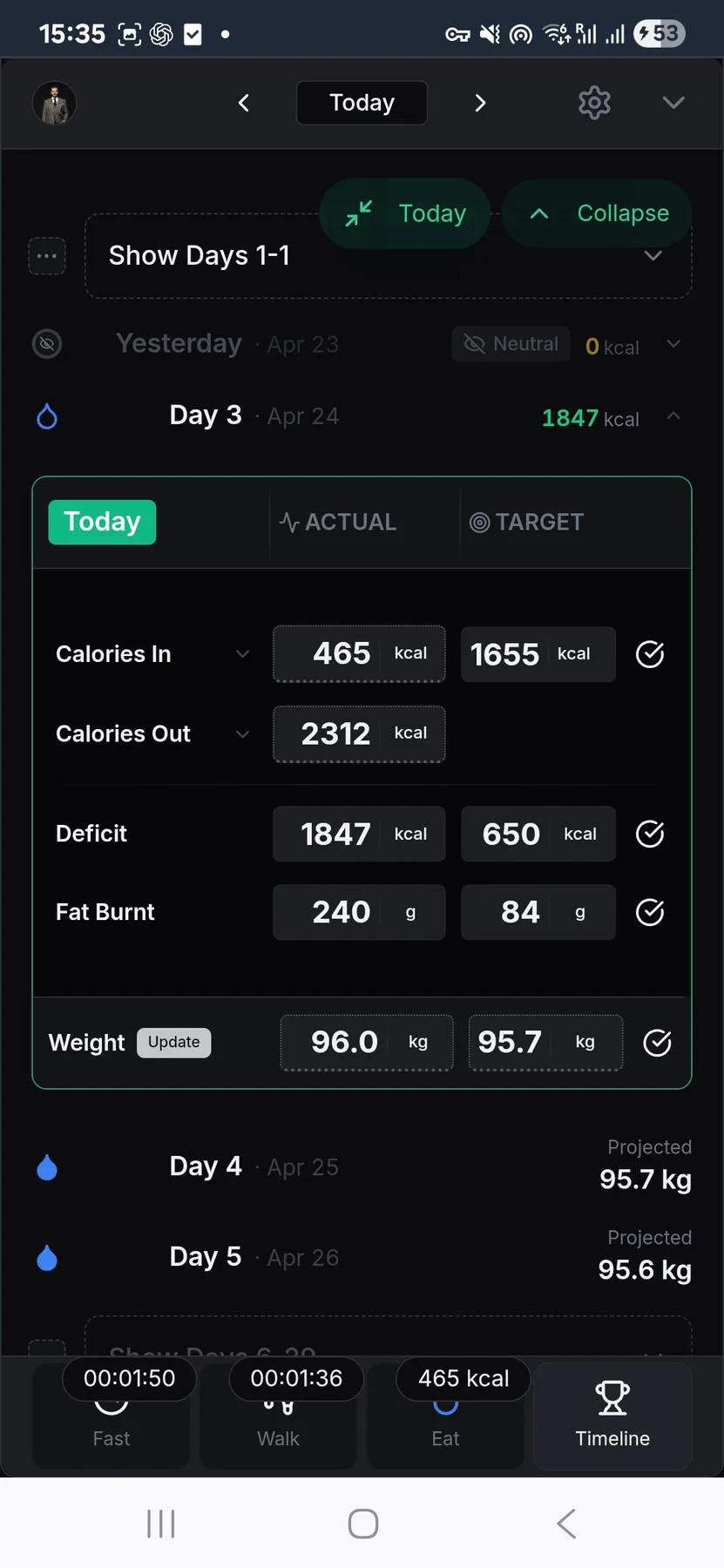
The Challenge pulls from your food, walking, and weight logs into one timeline card per day. You don't re-enter anything.
- 3
Adjust the goal, reactivate if needed
Edit goal weight mid-challenge and daily targets recalculate. Reactivate a finished challenge within 24 hours; otherwise start a new one.
How the 90-Day Challenge works
What the 90-Day Challenge actually does
The 90-Day Challenge is a free, configurable challenge window from 30 to 180 days that turns a goal into a structured timeline. The trackers work on their own; the Challenge is the optional structured program on top, and it is free too.
When you set one up, you provide:
- Start date — today, or a future date to schedule ahead
- Current weight and goal weight
- Duration — 90 days by default, adjustable from 30 to 180
From your goal and duration, the app calculates your daily calorie target and deficit. The duration is fixed once the challenge starts. There is no adaptive timeline that stretches or compresses based on progress, no banking of surplus days, no multi-week phases. You pick a window and the Challenge holds you to it.
What you see day to day
At the top: Day X of Y, a progress bar, days remaining, and a projected end date calculated from your start.
Below that, a Challenge Timeline — one card per day showing food, walking, and weight data auto-aggregated from the respective trackers. You don't re-log anything; the Challenge pulls from whatever you recorded in the Calorie, Walking, and Weight trackers for that date. Days before today show history; today's card updates live as you log.
Mid-challenge changes
- Goal weight is editable while the challenge is active. Changing it recalculates the daily calorie and burn targets so the Challenge stays aligned with the new goal.
- Reactivation — a completed or cancelled challenge can be reactivated within 24 hours of ending. After that window, starting again means creating a new challenge.
- Scheduling ahead — set a future start date to queue up the next block before the current one wraps.
How to use the Challenge
Choose a duration that feels serious but believable — 60 to 90 days is often the sweet spot. Review weekly, not daily; the timeline cards are built for pattern spotting, not hour-by-hour reaction. If the goal weight needs to move, edit it inline and let the daily targets update, instead of running the math in your head.
App Features


Intermittent Fasting Tracker
Free intermittent fasting tracker — pick a window, run it with a live timer, and keep a rolling record of what you actually did.

Extended Fasting Tracker
Run a deliberate long fast from 24 to 168 hours, with stage content through the first 72 hours and milestone callouts.


Weight Tracking
Free weight tracker — log daily, edit any entry inline, and watch the trend over time.


Walking Tracker
Free walking tracker — start a timer, pick your pace, and let pause/resume handle real-life interruptions.

Calorie Tracker
Free manual calorie tracker — log meals once, save them to My Foods, and watch your daily remaining calories update live.
Frequently asked questions
What does the 90-Day Challenge add to the free trackers?
The free trackers stay free. The 90-Day Challenge is the optional structure layer that turns your food, walking, and weight logs into one defined block with a finish line. The name is just the default length — you can set it anywhere from 30 to 180 days to match your goal.
What it adds on top of the trackers:
- Day X of Y and a progress bar
- A projected end date based on your target
- One timeline where food, walking, and weight come together
What do I set when creating a Challenge?
Just the basics — the app works out the rest:
- Your current weight and goal weight
- Duration — 90 days by default, adjustable from 30 to 180
- Start date — today, or a future date so you can queue the next block
From your goal and duration, the app calculates your daily calorie target and deficit for you — you don't set those by hand. Once the Challenge starts, the duration is fixed.
Do I have to re-log food, walking, and weight into the Challenge?
No. The Challenge auto-aggregates from the Calorie, Walking, and Weight trackers. Whatever you log in the individual trackers appears on the matching Challenge day. Today updates live as you log, and past days remain as history, so the timeline becomes a review layer rather than another data-entry chore.
Can I change my goal weight mid-challenge?
Yes. Goal weight is editable while the Challenge is active. Changing it recalculates the daily calorie and burn targets so the dashboard stays aligned with the new target. You can also reactivate a completed or cancelled Challenge within 24 hours; after that, starting again means creating a new one.
Does the Challenge adjust the end date if I am ahead or behind?
No. The Challenge duration is fixed once it starts. There is no adaptive timeline, no banking of surplus days, and no automatic extension when a week goes badly. That is deliberate: the dashboard shows what happened, but it does not quietly move the finish line for you.
Use this feature now
90-Day Challenge
The web app works on every device, including iPhone. Android users can also install the native app from the Play Store.