Calorie Tracker
Free manual calorie tracker — log meals once, save them to My Foods, and watch your daily remaining calories update live.
- My Foods
- Templates
- Liquid tracking
- Macro toggles
- Free
The web app works on iPhone, Android, desktop, and tablet — same experience everywhere. Prefer a home-screen icon and native notifications on Android? Get the Android app instead.

What it can do
Set your target and display
One calorie number in your profile anchors every day. Choose whether the main display leads with calories eaten or calories remaining — whichever framing keeps you consistent.
Log once, reuse forever
My Foods saves every entry you've logged before. Templates bundle multi-item meals into one tap.
Turn on macros and adjust the view
Toggle protein and fat from your food settings to add full macro totals. Switch to compact view when the default card layout takes more space than you need.
Track liquids alongside food
Enable liquid tracking to log water, coffee, and zero-calorie drinks alongside food, each with its own configurable serving size.
How the Calorie Tracker works
What the Calorie Tracker actually does
The free Calorie Tracker is a manual food log — you enter foods yourself, with calories per 100g or per unit. There is no barcode scanner. AI text, voice, and photo input are free shortcuts, but every draft still belongs in the same editable food log. Accuracy comes from checking the numbers once, then reusing that entry on the days the same food appears again.
Two reuse surfaces make repeat logging fast:
- My Foods — your personal library of everything you've logged before, pickable with one tap on future days.
- Templates — group multiple foods into a reusable meal (for example, "Breakfast") that logs all items at once.
Carbs are tracked on every entry. Protein and fat are optional — toggle "Show protein and fat" from your food settings to add full macro totals to every log entry and the daily summary.
The display and what you can switch
The day header shows your daily calorie target, calories eaten, and calories remaining in real time. Two display modes control what leads:
- Eaten (default) — calories consumed so far is the primary number; remaining is shown as a secondary figure.
- Remaining — flips it: budget left leads, consumed is secondary. Better if you prefer to think in terms of what you have left rather than what you have spent.
Compact view collapses each log entry to a tighter single line. Once My Foods is built up and logging is quick, compact mode keeps the list navigable on small screens without scrolling past oversized cards.
When you log multiple units of the same food on one day, the tracker groups them (for example, "6x Egg") so the list stays readable. Open any entry from its menu to edit the calories. Delete soft-removes the entry so an accidental tap is recoverable.
History shows the last 30 days by default; load-more reveals everything beyond that.
What you can turn on or off
The tracker is configurable from your food settings:
- Protein and fat tracking — adds protein (g) and fat (g) to every logged entry, and a daily macro total at the top of the screen.
- Fat Budget — during an active 90-Day Challenge, shows a running fat-balance number on your timeline and stats, on top of your calorie budget.
Liquid tracking
Liquid tracking is a separate optional layer that sits alongside the food log. It is off by default — enable it and the liquid tracker appears on the food screen below your daily calorie summary.
Three drink types are supported, all on by default once liquid tracking is enabled, each with its own serving size:
- Water — default serving: 250 ml. Counts toward your daily goal.
- Coffee — default serving: 300 ml. Tracked, but does not count toward your daily goal.
- Zero-calorie drinks — default serving: 330 ml. Counts toward your daily goal.
All three share one daily goal, 2,100 ml by default. Tap any drink type to log a serving. Tap again to add another. Serving sizes are adjustable per drink type from Liquid Settings; units switch between ml and oz there too.
How to use the tracker
Log as you eat, not at the end of the day — backfilling from memory is where accuracy drops hardest. Build My Foods early, so logging becomes taps rather than typing. Set your daily calorie target in your profile and treat the remaining number as your budget, not a score.
App Features

Intermittent Fasting Tracker
Free intermittent fasting tracker — pick a window, run it with a live timer, and keep a rolling record of what you actually did.

Extended Fasting Tracker
Run a deliberate long fast from 24 to 168 hours, with stage content through the first 72 hours and milestone callouts.

Weight Tracking
Free weight tracker — log daily, edit any entry inline, and watch the trend over time.

Walking Tracker
Free walking tracker — start a timer, pick your pace, and let pause/resume handle real-life interruptions.
90-Day Challenge
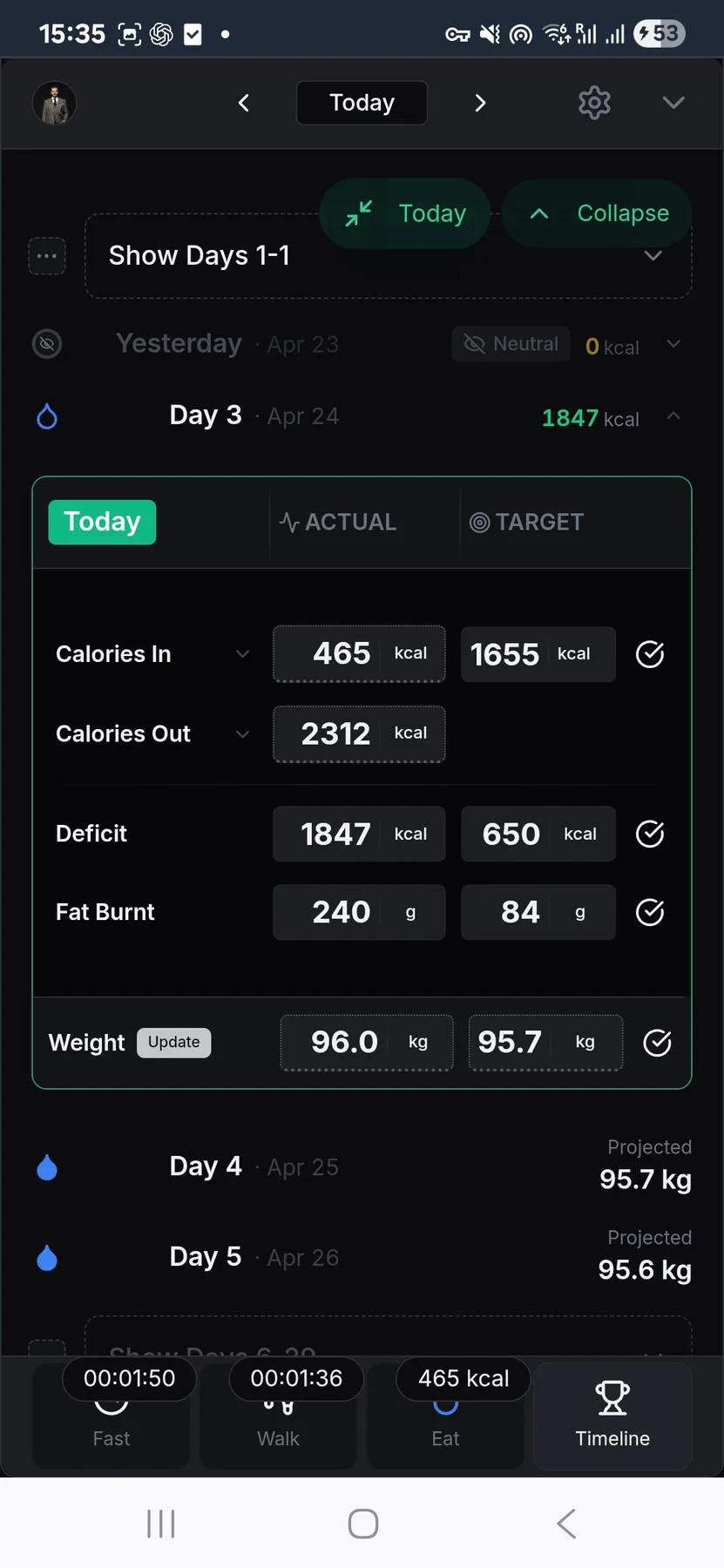
The structure layer: set a goal weight, pick 30 to 180 days, and the app aggregates every food, walking, and weight entry into one timeline.
Frequently asked questions
Is the calorie tracker automatic, or do I enter foods myself?
The free tracker is manual: you enter foods with calories per 100g or per unit. There is no barcode scanner. Sponsorship adds AI text, voice, and photo input as shortcuts, but every draft stays editable and should be checked before you rely on it. The speed comes from saving foods once, then reusing them.
How do My Foods and Templates work?
They are the reuse layer for meals you repeat.
- My Foods saves every food you've logged before, so it is pickable later.
- Templates bundle several foods into one reusable meal, like breakfast or lunch.
The first log takes attention. The repeated log should become a few taps.
How accurate does my logging need to be?
Accurate enough that the remaining-calories number stays useful. Use the label when you have one, estimate honestly when you do not, and edit the entry later if needed. A logged estimate is more useful than an empty day.
Can I copy, edit, or delete meals after logging them?
Yes. You can edit calories from an entry's menu. Delete is soft, so an accidental tap is recoverable.
What does the tracker show during the day?
The day header shows your calorie target, calories eaten, and calories remaining as you log. Carbs are tracked by default. Protein and fat can be enabled from your profile if you want full macro totals. History shows recent days first, with load-more for older entries.
Use this feature now
Calorie Tracker
The web app works on every device, including iPhone. Android users can also install the native app from the Play Store.